Run loyalty from your phone
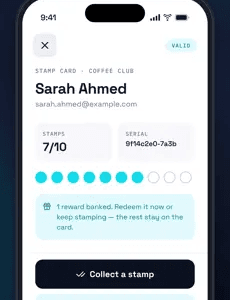
The Stamper App is built for fast in-store use. Staff scan a customer's card, add stamps or redeem rewards, and move on. One screen, no training, no hardware.
- Scan digital stamp cards with the phone camera
- Add stamps or redeem rewards in one action
- Free on iOS and Android, no POS integration
Free for 15 days, no credit card required.
Built for busy counters
Replace the ink stamp and the stack of paper cards with the phone your staff already carry.
Scan customer cards
Point the camera at the card in the customer's wallet. Their card, balance and available rewards appear instantly.
Stamp and reward instantly
Add one or more stamps, or redeem a reward, in a single flow with a confirmation each time.
Track every transaction
Each stamp and redemption is logged with the time, the staff member and, optionally, the location.
Enrol customers on the spot
Show the in-app QR code and the customer joins in seconds, with nothing to download.
Designed for real-world use
No POS integration required
The app works independently of your till, so it runs the same at a kiosk, a food truck or a salon reception.
Works on iOS and Android
Install it on staff phones or a shared tablet at the counter.
Multiple staff, separate logins
Each team member gets a sub-user login. They can stamp and redeem but cannot see customer lists or billing.
Mistakes are easy to fix
Staff confirm before a stamp applies and can remove stamps within limits. Every action stays in the log.
Add NFC tap stamping
For the busiest counters, pair the program with a Wally NFC reader. Customers hold their phone to the reader and the stamp lands in under a second.
How it works
- 1
Scan
Scan the customer's digital card. Their balance and rewards appear.
- 2
Stamp
Add stamps or redeem a reward in one tap, with a built-in confirmation.
- 3
Reward
Confirm the action. The card in the customer's wallet updates instantly.
Stamper App: questions
Do customers need the Stamper App?
No. Only staff use it. Customers keep their card in Apple Wallet or Google Wallet.
Does it work on iOS and Android?
Yes, the Stamper App is free on both.
Is POS integration required?
No. The app works independently of your point of sale.
Can multiple staff use it?
Yes. Create a sub-user login for each team member in the dashboard.
What if a stamping mistake happens?
Staff confirm each action before it applies and can remove stamps within set limits. Every change is recorded.
Is every transaction recorded?
Yes. All stamps and redemptions appear in the web dashboard with the staff member and time.
Start stamping in minutes
Create an account, publish your card and use the Stamper App to scan, stamp and reward customers.